10. Fuse#
The Joulescope JS220 includes a fuse feature. The fuse is software-controlled and operates using the measured current and existing shunt selection MOSFETs. The fuse implements four different channels:
User 1 Fuse
User 2 Fuse
Range Fuse
Max Fuse
The Range Fuse and Max Fuse are configured to protect your Joulescope JS220 from damage. You can configure the two User Fuses to protect your connected target equipment and power source.
The JS220 uses an algorithm that emulates traditional fuses. The algorithm contains coefficients that allow the fuse to “heat up” and “cool off”. Like a traditional fuse, the algorithm operates on power (current squared). For each time step, the algorithm is:
If an > T, then the fuse engages and breaks the circuit from Current + to Current -.
If a fuse engages, first investigate what caused the overcurrent condition.
Modify your test setup to prevent the overcurrent condition from occurring. If
you are using the Joulescope UI, press the  icon
on the sidebar to clear all engaged fuses. You can also clear individual fuses
for each instrument using the Device Control widget.
icon
on the sidebar to clear all engaged fuses. You can also clear individual fuses
for each instrument using the Device Control widget.
The fuse feature was added on 2023-10-26 with FPGA 1.1.0 and FW 1.1.0. The latest version of the Joulescope UI will automatically update your JS220 to include this fuse feature.
10.1. Max Fuse#
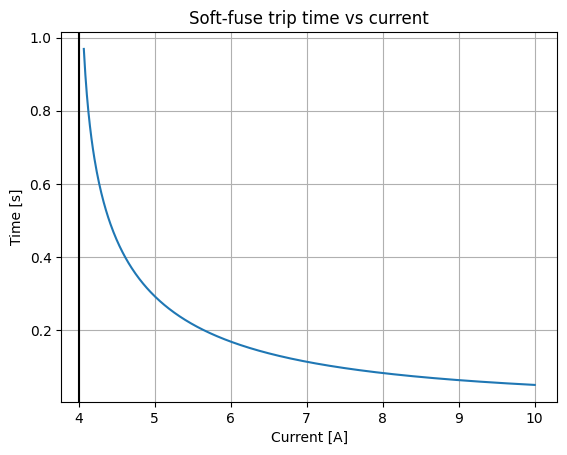
The Max Fuse protects your JS220 from over-specification current events. The engage time versus a fixed input current is:
10.2. Range Fuse#
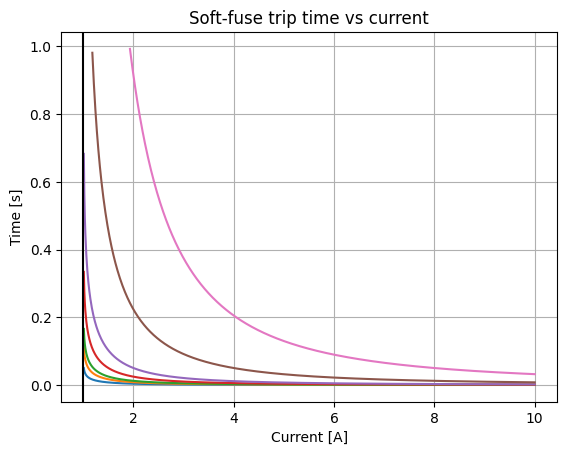
The Range Fuse protects your JS220 for each current range. This fuse is only meaningful when you manually select a fixed current range. While in the default “auto” current range mode, the JS220 will always autorange before this fuse engages.
The response for each current range is:
10.3. User Fuses#
The JS220 includes two optional, user-configurable fuses. You can use these fuses to protect your connected equipment with a current response that is tuned to your equipment. Note that the Max Fuse and Range Fuse are always active. If you configure a User Fuse to be less responsive, then the fixed fuse will engage first.
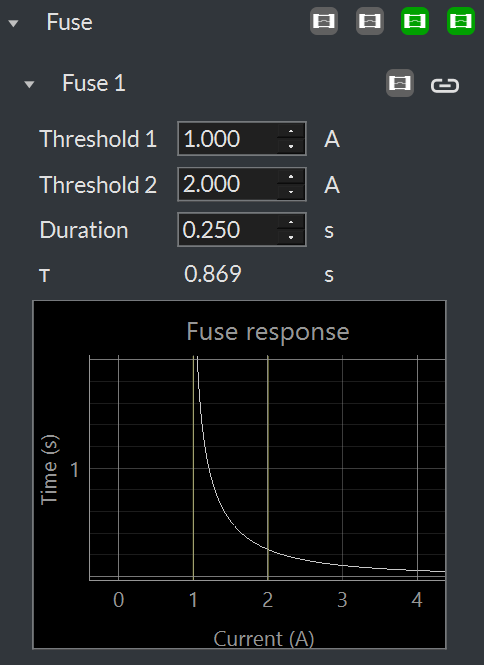
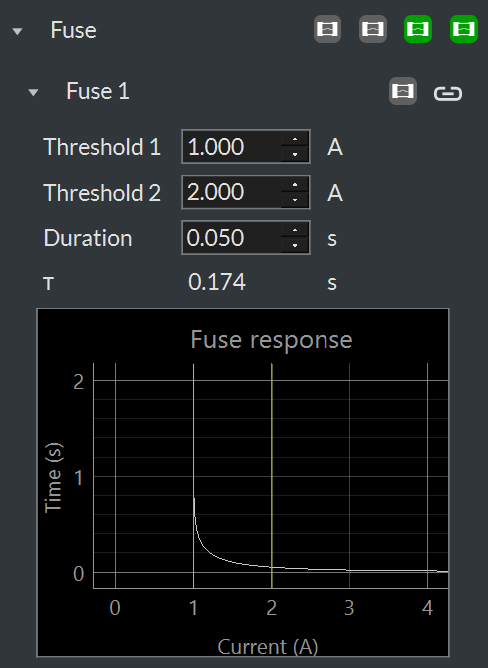
Specifying the two coefficients T and K directly is not intuitive. Instead, the UI allows you to specify two current thresholds and a duration. The first threshold is the minimum trip current. Any current less than this first threshold will never cause the fuse to engage. A constant current at the second threshold for the given duration will cause the fuse to engage. Together, these three constants determine the fuse response. When you select the constants, the UI will display the resulting response curve. The following figures show the response curve with the same thresholds but different durations: