
3. Trim Calibration#
While the JS220+ offers significant offset performance improvements relative to the JS220, it may require trim calibration to achieve the full offset accuracy performance.
The Joulescope UI 1.0.40 and later includes offset trim calibration. Before starting a trim calibration, please run your JS220+ for at least 5 minutes to allow the temperature to stabilize. To start a current offset trim calibration, select the Device Control widget in the sidebar, then press Calibrate:
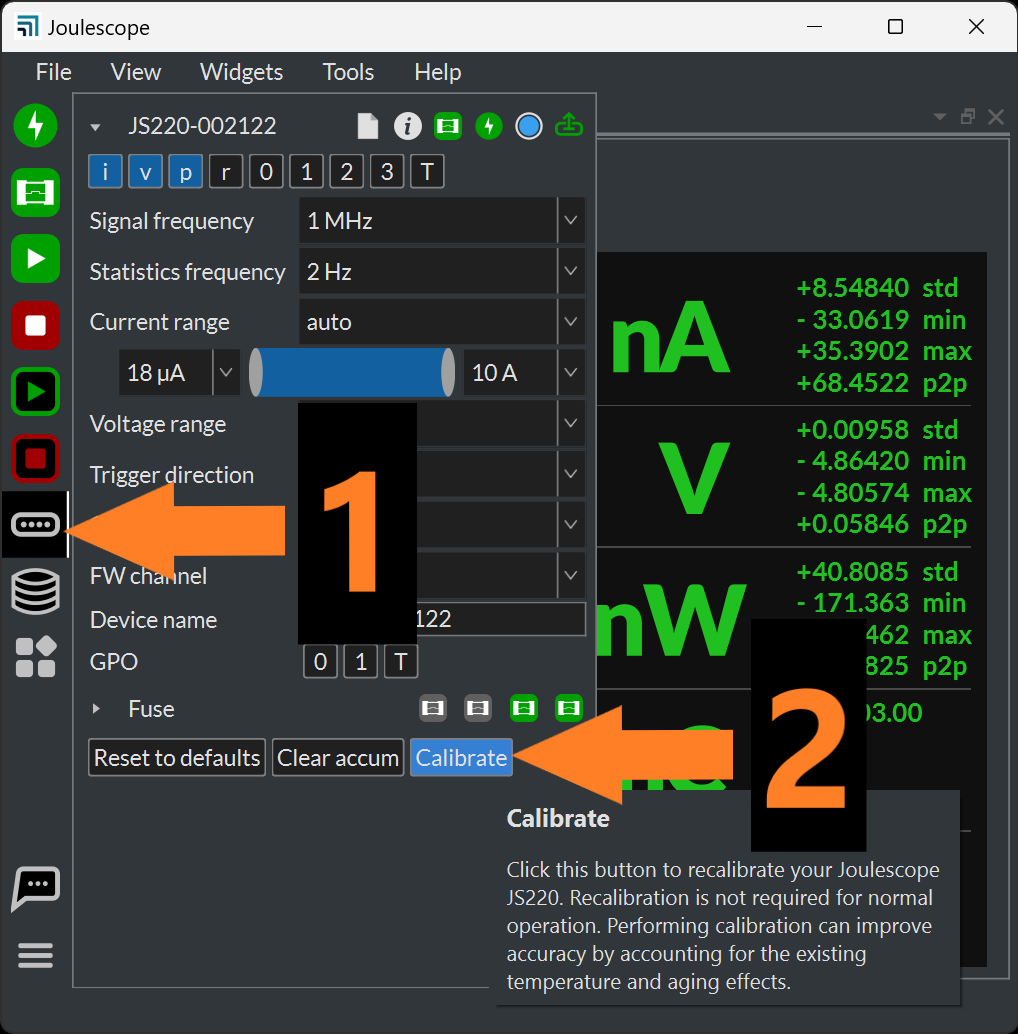
Press Start for Current offset, and follow the onscreen instructions.
The JS220+ uses an internal fixed-point representation of 5Q31 for current samples. 2⁻³¹ represents an accuracy of ±0.5 nA. After performing trim calibration, the instrument offset may be off by up ±0.25 nA. However, the trim offset calibration specification accounts for this initial error.